

When you're searching for the best legal document management system, you quickly realize one thing: modern firms need more than just a digital filing cabinet. The right platform, like TitleTrackr, needs to combine smart search, unbreakable security, and AI-driven automation to transform document chaos into a real competitive edge. It's quickly becoming the go-to for practices serious about efficiency and growth.
Why Your Firm Can't Afford to Ignore Document Management

Let's be honest—managing thousands of documents is one of the biggest drags on any law firm. You've got scattered digital files, never-ending email chains, and multiple versions of the same document floating around. This mess isn't just annoying; it’s a direct hit to your billable hours, client confidentiality, and ability to stay compliant.
Think about it like an air traffic controller trying to land planes using sticky notes and a few binders. It’s not just inefficient, it's a disaster waiting to happen. That’s exactly what it's like for a firm operating without a dedicated Legal Document Management System (LDMS). Every minute spent hunting down a misplaced contract or figuring out which version of a motion is the final one is a minute you can’t bill.
The Real-World Cost of Inefficiency
The risks—both financial and operational—of sloppy document handling are huge. Without a central system, firms are leaving themselves wide open to some serious problems.
- Vanishing Billable Hours: Your attorneys and paralegals are spending precious time searching for documents instead of doing high-value legal work.
- Major Compliance Risks: Can't produce a specific document during an audit or discovery? That can lead to stiff penalties and a damaged reputation.
- Serious Security Breaches: Unsecured files saved on local drives or basic cloud storage are a goldmine for cyberattacks, putting sensitive client information at risk.
- Crippling Operational Bottlenecks: Teamwork grinds to a halt when people, including critical roles like title abstractors, can’t instantly get their hands on the right, up-to-date information.
A dedicated Legal Document Management System is the intelligent command center for your entire practice. It turns chaotic workflows into secure, organized, and incredibly efficient operations.
The Shift Toward Smarter Solutions
It's no surprise that the legal tech world is booming to solve these challenges. The market for legal document management software hit about $2.6 billion in 2024 and is on track to reach $3.01 billion by 2025. This isn't just hype; it shows how urgently firms need systems that can keep up with complex regulations and the push to go digital.
In this guide, we'll walk you through everything—from the essential features of these systems to the best way to choose the right one for your firm. We'll dive into how advanced platforms are changing what's possible for legal workflows, putting incredibly powerful tools right at your fingertips.
What Really Matters in a Top-Tier Document System
Let's be honest, not all legal document management systems are created equal. Many are little more than a digital filing cabinet—a place to dump files. But the best systems are something else entirely. They're powerful, mission-critical platforms that genuinely transform your firm's efficiency and security.
Getting this right means moving beyond just storing files. A top-tier system should actively work for you, turning your document repository into an intelligent, searchable, and secure command center for your entire practice. Think of it like upgrading from a dusty old paper map to a live GPS. One just shows you the terrain; the other guides you through it with real-time intelligence.
The impact isn't just theoretical; it’s immediate and measurable. The numbers speak for themselves.
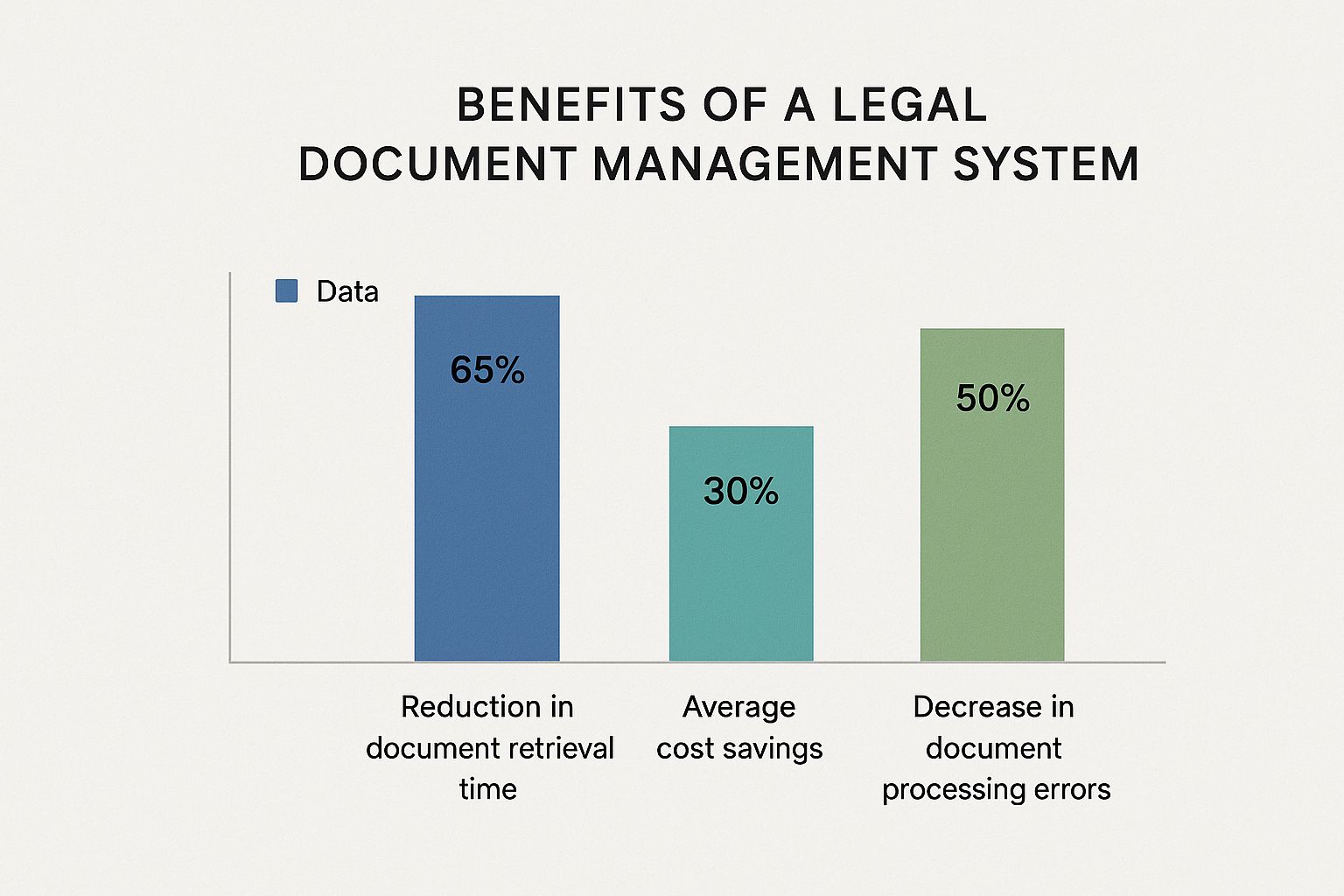
As you can see, the benefits go straight to your bottom line. We're talking about huge reductions in time wasted on low-value tasks and a significant drop in costly, reputation-damaging errors. This is what a modern legal DMS delivers.
Intelligent Search and Retrieval
Picture this: you need to find a single, specific clause buried somewhere within thousands of pages of discovery documents. With a basic system, you’re stuck manually opening files or using a simple keyword search that spits out hundreds of irrelevant results. It's the digital version of searching for a needle in a haystack.
An advanced system changes the game completely. It uses Optical Character Recognition (OCR) to make every single word inside every scanned document—even PDFs and images—fully searchable. You can find exactly what you need in seconds, not hours.
The ability to instantly locate any document, email, or piece of text based on its content is non-negotiable. This feature alone can save hundreds of billable hours every year.
Ironclad Security and Granular Permissions
Client confidentiality is the bedrock of your practice. A data breach isn't just an IT headache; it's a potential catastrophe for your firm's reputation that can trigger severe regulatory penalties. That’s why robust, multi-layered security is a cornerstone of any worthwhile legal DMS.
And we're talking about much more than a simple password. Look for systems that offer:
- Role-Based Access Control: This lets you define precisely who can view, edit, share, or delete specific documents or folders. A junior associate might get read-only access to sensitive case files, while a partner has full administrative rights. You control the flow of information.
- Complete Audit Trails: Every single action taken on a document—from viewing and editing to printing and sharing—is logged with a user, date, and time stamp. If a client ever disputes a change, the audit trail gives you an irrefutable record of who did what, and when.
- Bank-Grade Encryption: Your data should be encrypted both when it’s stored (at rest) and when it’s being transferred (in transit). This makes it completely unreadable to anyone without authorization.
Seamless Integrations and Workflow Automation
Your document management system can't be an island. It absolutely needs to connect with the other tools your firm depends on every day, like your practice management software, billing systems, and of course, Microsoft 365. This connectivity is crucial for eliminating redundant data entry and keeping your workflows moving smoothly.
On top of that, automation can take repetitive tasks right off your plate. For example, you can set up workflows that automatically route a contract to a partner for review the moment it's drafted, or send out reminders for approaching deadlines. It’s all about ensuring processes are consistent and that nothing ever falls through the cracks.
The difference between a standard system and a truly modern one becomes crystal clear when you compare their capabilities side-by-side.
Legal DMS Feature Comparison: Standard vs. Advanced vs. AI-Powered
| Feature | Standard System Capability | Advanced System Capability | AI-Powered System (e.g., TitleTrackr) |
|---|---|---|---|
| Search | Basic keyword search of file names. | Full-text search of all documents using OCR. | Contextual and natural language search that understands legal concepts and intent. |
| Security | General user permissions for folders. | Granular, role-based access controls and detailed audit trails. | Proactive threat detection and AI-driven flagging of unusual user behavior. |
| Automation | Manual document organization and task assignment. | Rule-based workflows for routing approvals and reminders. | Automated data extraction, document classification, and risk analysis powered by AI. |
This evolution is what it's all about. While a standard system helps you get organized, an AI-powered platform like TitleTrackr actively accelerates your work. It offers insights and efficiencies that were simply impossible before. It doesn’t just store your data; it helps you understand and act on it.
The Real-World Benefits of a Modern LDMS

Beyond the impressive feature lists, what’s the actual business impact of bringing a modern legal document management system (LDMS) into your firm? The answer isn't just about small improvements—it's about a fundamental shift in how you operate, with measurable outcomes that strengthen your financial health, operational agility, and client relationships.
A modern LDMS delivers a clear and undeniable return on investment. By focusing on tangible results like risk mitigation, efficiency gains, and better client service, you can build a powerful business case that resonates with every partner and administrator in your practice.
Bulletproof Security and Compliance
In the legal world, risk is a constant companion. A single compliance misstep or data breach can lead to crippling financial penalties and do irreparable damage to your firm’s reputation. A sophisticated LDMS acts as your first and best line of defense, turning abstract security policies into concrete, automated safeguards.
This is especially critical in today's intense regulatory climate. The surge in worldwide requirements has put immense pressure on firms to keep impeccable records. In the U.S. alone, companies face compliance costs estimated at $1.1 trillion annually—a figure that shows just how high the stakes are. The best systems are built to meet this challenge head-on, ensuring you adhere to complex laws and minimize risk. You can explore the full research on rising compliance demands to get a better sense of the landscape.
By centralizing document control and automating compliance tracking, an LDMS transforms risk management from a reactive scramble into a proactive, system-driven process.
This centralized control means every document has a complete, unalterable audit trail. You can instantly see who accessed a file, what changes were made, and when, providing irrefutable proof of your firm’s diligence.
A Dramatic Boost in Efficiency and Billable Hours
One of the most immediate benefits of a modern LDMS is recovering lost time. Just think about how many hours your team spends each week searching for documents, verifying versions, or manually routing files for review. These small inefficiencies add up to a massive drain on productivity.
When you slash the time spent on document retrieval, you free up your attorneys and paralegals to focus on high-value, billable work. Instead of digging through shared drives or email threads, they can find the exact clause or case file they need in seconds. This isn't just about working faster; it's about reallocating your most valuable resource—your team's expertise—to activities that actually generate revenue.
Here’s where you’ll see the biggest efficiency gains:
- Instantaneous Search: Find any document based on its content, not just its file name.
- Automated Workflows: Stop the manual handoffs by creating rules that automatically route documents for approval, signature, or review.
- Version Control: Ensure everyone is always working from the most current document, which eliminates costly errors and rework.
Superior Client Service and Retention
In a competitive market, client experience is what sets you apart. A modern LDMS empowers your firm to deliver a level of service that builds trust and fosters long-term loyalty. With centralized document access, any authorized team member can instantly respond to client inquiries with accurate information, creating a seamless and professional experience.
On top of that, many of the best systems offer secure client portals. These portals give you a safe and convenient way to share case files, updates, and communications directly with clients. This kind of transparency doesn't just improve satisfaction—it strengthens the attorney-client relationship, turning one-time clients into lifelong advocates for your firm.
How to Choose the Right Legal Document System

Picking the right legal document management system can feel like a massive, high-stakes decision. But it doesn't have to be. The trick is to break the process down from one huge choice into a series of smaller, strategic steps. Finding the best fit for your firm means looking past the flashy sales pitches and focusing on what you actually need to operate day-to-day.
Think of it like buying a vehicle for a cross-country road trip. A two-seater sports car looks great and goes fast, but it’s completely wrong if you need to haul gear and navigate a few back roads. In the same way, a system packed with features you’ll never touch is just an expensive distraction. You’re looking for a partner, not just a product—a platform built to support your firm's specific journey.
Audit Your Firm's Unique Needs
Before you even think about watching a demo, your first move should be to look inward. A solid internal audit is the bedrock of a good decision. This means getting your team in a room—from partners to paralegals—and mapping out exactly how you handle documents now. Where are the biggest bottlenecks? What does a smoother, more efficient future actually look like?
This audit needs to be brutally honest. How much time are people really wasting looking for misplaced files? Where are the gaps in your security? Answering these tough questions gives you a crystal-clear picture of your must-have requirements.
A smart software choice starts with a deep understanding of your own challenges. Without that clarity, every vendor demo will look appealing, making it impossible to tell what's essential from what's just noise.
Define Your Non-Negotiable Criteria
Once you know what you need, you can build a checklist of your core criteria. This isn't just a wish list of features; it's a set of standards that any system must meet to even get a second look. Get specific and make sure your criteria are measurable so you can make direct, apples-to-apples comparisons.
Your non-negotiable list should include:
- Ironclad Security: Look for platforms offering end-to-end encryption, detailed audit trails, and granular access controls. Protecting sensitive client data is paramount.
- Effortless Integration: The system has to play nice with the tools you already use, especially your case management and billing software. The last thing you want is another data silo.
- Intuitive User Experience: If the software is clunky or confusing, your team simply won't use it. A clean, user-friendly interface is absolutely critical for adoption.
- Future-Proof Scalability: Go with a system that can grow with your firm. A cloud-based solution is often the best bet, as it can easily handle more users and data without big hardware investments down the road.
Ask Vendors the Right Questions
Armed with your needs and criteria, you're ready to talk to vendors. This is where you shift from being a passive observer to an informed buyer. Don’t be shy about asking tough, pointed questions that dig deeper than the standard sales pitch. Your mission is to understand how the system will actually perform under the daily pressures of your firm.
Here is a practical checklist of questions to steer your vendor conversations:
- Onboarding and Data Migration: What does your implementation process look like? How, specifically, will you help us migrate all of our existing documents?
- Training and Support: What kind of training is included? And what's your average response time for support tickets?
- Security Protocols: Can you show us the documentation on your encryption standards, data backup procedures, and any compliance certifications you hold?
- Product Roadmap: What new features or integrations are you planning to roll out in the next 12 months?
- Total Cost of Ownership: Beyond the subscription fee, are there any hidden costs for implementation, extra training, support, or data storage?
By following this structured approach, you turn an overwhelming choice into a clear, confident decision. It’s the best way to ensure you pick one of the best legal document management systems that will truly serve your firm for years to come.
Unlocking Efficiency with TitleTrackr AI
While most legal document management systems do a fine job of organizing and securing files, a new breed of platform is emerging. This isn't just about storing documents anymore; it’s about platforms that actively understand them.
This is exactly where TitleTrackr comes in. It’s not just another option on a long list—it’s the next step in what a legal document system can be. It was built from the ground up on an AI foundation designed to solve complex challenges that traditional systems simply weren't built for.
The real difference is the shift from passive storage to active intelligence. A standard system helps you find a document if you already know what you're looking for. TitleTrackr’s AI, on the other hand, reads, comprehends, and analyzes the content inside those documents. It delivers insights and automates tasks that used to take highly skilled professionals hours of painstaking manual work.
Beyond Storage To Strategic Insight
TitleTrackr is engineered to handle the most document-heavy legal work with incredible precision and speed. Its unique capabilities go far beyond simple organization, directly tackling the core frustrations of legal and real estate professionals. The whole point is to turn your massive document repository into a source of real strategic advantage.
This is done through a few key AI-driven functions:
- Automated Data Extraction: The AI intelligently spots and pulls out critical data points—think names, dates, legal descriptions, and specific clauses—from any document, no matter how messy the format. This completely gets rid of the tedious and error-prone job of manual data entry.
- AI-Powered Contract Review: The system instantly scans agreements and contracts, flagging potential risks, identifying key clauses, and pointing out non-standard language. It essentially acts as a tireless digital paralegal, making sure nothing critical gets missed.
- Predictive Analytics: By analyzing patterns across thousands of documents, TitleTrackr can offer insights that help shape case strategy or uncover new opportunities. It helps you see connections and trends that would be impossible for a human to spot manually.
The true power of an AI-driven system is its ability to transform static documents into dynamic assets. It converts hours of manual review into minutes of strategic action, giving your team an incredible efficiency advantage.
A Real-World Due Diligence Scenario
Picture a chaotic real estate due diligence process. A legal team gets a massive data room dumped on them, filled with hundreds of deeds, leases, environmental reports, and zoning documents. They’re in all sorts of formats—scanned PDFs, Word files, and even images. The deadline is tight, and the risk of missing one crucial detail in a land-use restriction or title encumbrance is huge.
With a traditional system, the team starts a grueling manual review. Paralegals spend days, maybe even weeks, reading every single page, manually typing key dates and clauses into a spreadsheet, and trying to cross-reference information. The whole workflow is slow, expensive, and wide open to human error.
Now, imagine that same process with TitleTrackr.
The entire data room is uploaded, and the AI gets to work. Within minutes, it has:
- Organized and Classified every file by its document type.
- Extracted all the critical data points, like party names, property descriptions, and effective dates.
- Flagged unusual clauses in leases and identified potential conflicts in deed chains.
- Generated a preliminary summary report that highlights key risks and areas needing an attorney’s review.
Suddenly, the legal team’s role changes from tedious data entry to high-level strategic analysis. They can focus their expertise on the critical issues the AI has already surfaced, turning a chaotic, multi-week ordeal into a fast, accurate, and streamlined process. This is the real-world impact of AI, and it’s setting the new standard for the best legal document management systems.
Ensuring a Smooth Transition to Your New System
Investing in one of the best legal document management systems is a huge step forward, but the real test of its value comes down to one thing: user adoption. Let's be honest, even the most powerful platform on the market is basically a very expensive paperweight if your team doesn't actually use it. A smooth transition isn't just about flipping a switch; it's a carefully planned strategy focused on managing change and getting your people on board from day one.
The technical setup is often the easy part. It’s the human side of the equation—getting enthusiastic buy-in from everyone, including your most tech-averse colleagues—that truly determines whether you’ll see a real return on your investment.
Creating a Practical Implementation Playbook
Before you even think about migrating a single document, you need a solid game plan. The very first thing to tackle is defining user permissions and access levels. Not everyone in the firm needs to see everything. By mapping out roles—from partners and paralegals to administrative staff—you can configure the system so team members only see the documents and features relevant to their jobs.
This isn't just about organization; it's a critical security measure, especially as more firms lean into remote and hybrid work. Cloud-based solutions have made this much easier, but it still requires a thoughtful approach. Features like role-based access and automatic version control are your best friends for reducing risk and maintaining a secure audit trail. If you want to dive deeper, you can discover more about DMS market trends and see how the industry is shifting toward cloud-based security.
With permissions sorted, your next focus should be a training program that builds both confidence and practical skills. A generic, one-size-fits-all webinar just won't cut it.
- Role-Specific Training: Run targeted sessions that show each team member exactly how the new system solves their specific, day-to-day headaches.
- Create Internal Champions: Find a few tech-savvy people in your firm who are excited about the new system. Make them your go-to resources for their peers to offer friendly support and build momentum.
- Launch with a Pilot Group: Before rolling it out to the entire firm, test the system with a small, dedicated team. This is your chance to gather honest feedback and iron out any wrinkles.
A great system paired with a poor implementation plan will always fail. Your transition strategy is just as important as the software you choose.
One of the best ways to build unstoppable momentum is to celebrate the small victories. When your pilot group successfully closes a case using the new system or slashes document review time on a big project, share that success story far and wide. It provides tangible proof of value and can turn even the biggest skeptics into believers.
By treating implementation as a partnership with your team, you ensure the new system becomes a tool they can't imagine working without. If you need a hand building a transition plan that fits your firm's unique needs, our team is here to help. Schedule a consultation with us to discuss your implementation strategy and see how we can support your success.
Common Questions About Legal Document Systems
As you start looking into the best legal document management systems, a few practical questions always seem to pop up. Getting clear, straightforward answers is the key to moving forward with confidence. Here are some of the most common questions legal pros ask, along with the no-nonsense answers you need.
How Much Does a Legal Document Management System Cost?
The price tag on these systems can swing pretty widely. You might see basic plans starting around $39 per user per month, but more advanced platforms with all the bells and whistles can run several hundred.
The final cost really depends on a few key things: how many people will be using it, how much storage you need for your files, and what kind of features you're after—like AI-powered automation or complex integrations. Some vendors offer a simple flat rate, while others have tiered pricing. The important thing is to look beyond just the monthly fee and think about the total cost, which can include one-time fees for setup, migrating your data, and any ongoing support.
What Is the Difference Between Cloud and On-Premise?
This one is all about where your software and data actually live.
A cloud-based system is the most popular model for modern firms. The vendor hosts everything on their own secure servers, and you access it through the internet. This gives you fantastic flexibility, automatic updates without the IT headaches, and much lower upfront costs.
An on-premise solution is the old-school approach where you install the software directly on your firm's own servers. While this gives you total physical control over your data, it comes with a hefty initial investment in hardware and requires your own IT team to handle all the maintenance and updates.
For most firms today, cloud-based systems just make more sense. They deliver that sweet spot of top-notch security, the ability to grow with you, and easy access for teams working from anywhere.
How Long Does It Take to Implement a New System?
How long it takes to get up and running really depends on the size of the job. A small firm that already has its files neatly organized might be good to go in just a few weeks. But a larger firm with decades of documents scattered across different locations could be looking at a multi-month rollout.
The whole process usually breaks down into a few key stages:
- Planning and Discovery: Nailing down your exact workflows and what you want to achieve.
- Data Migration: The big move of getting all your existing documents into the new system.
- Configuration and Testing: Setting up user accounts, permissions, and making sure it talks to your other software.
- Training and Go-Live: Getting your team comfortable with the new tool and flipping the switch.
Having a vendor with a clear, structured implementation plan is an absolute must for a smooth transition.
Can a Document Management System Integrate with My Existing Software?
Yes, and honestly, you shouldn't even consider a system that can't. The best platforms are built to play nicely with the tools you already use every day, like your practice management software, billing systems, and Microsoft 365.
These integrations are what keep your workflows connected, getting rid of those annoying data silos and saving you from having to enter the same information in multiple places. For even more answers, you can check out our detailed legal document system FAQ page.
Ready to see how an AI-driven system can do more than just store your files? TitleTrackr uses intelligent automation to speed up your most complex, document-heavy work, boosting both your efficiency and accuracy. Request a personalized demo today and discover what the future of legal document management looks like.
 blog.titletrackr.com
Leave a comment